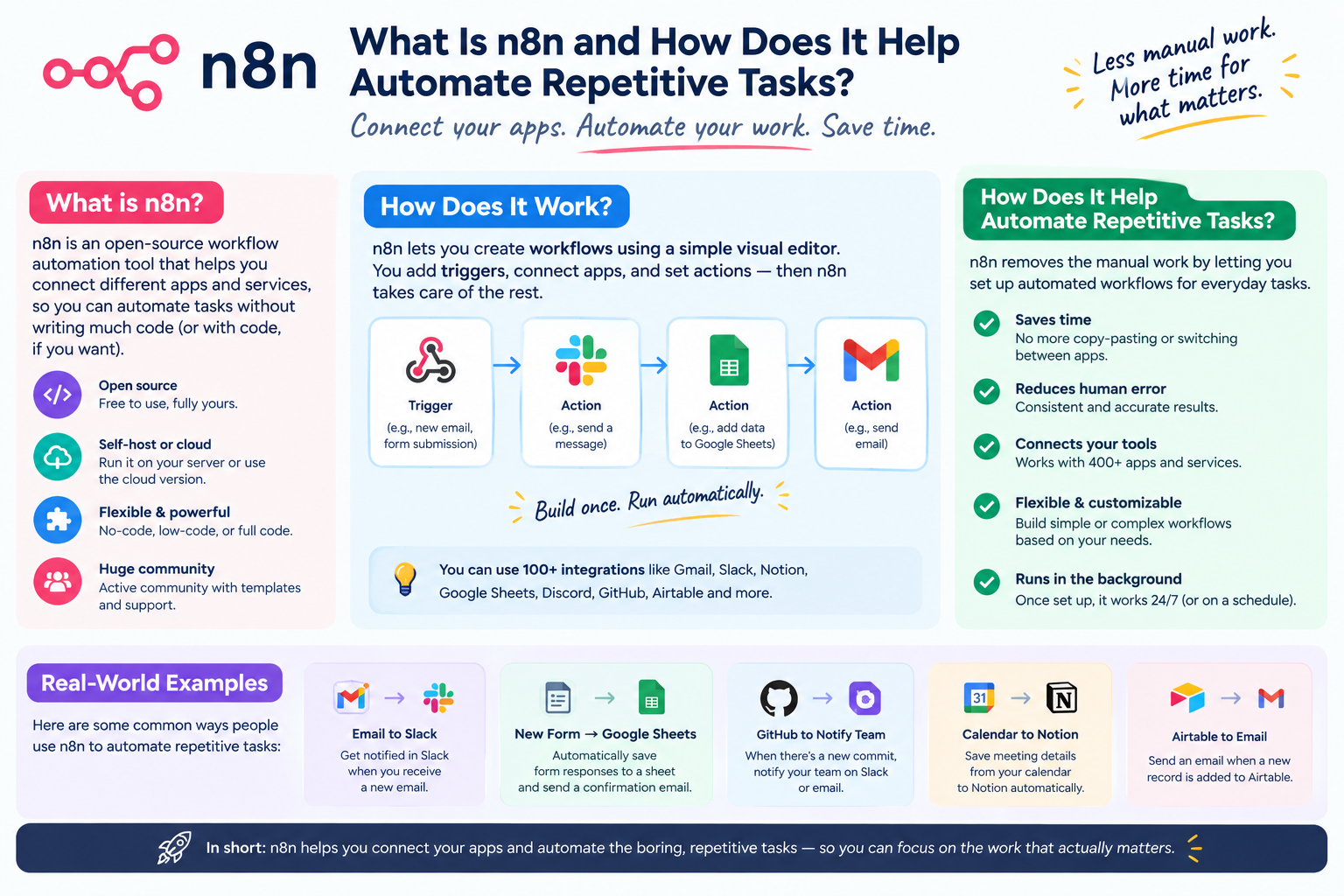
Quick answer: n8n is an open-source, low-code workflow automation tool that connects different apps, APIs, and services so tasks can run automatically without manual, repetitive work. It lets you build visual workflows — called “flows” — using drag-and-drop nodes, so data moves between tools like Gmail, Slack, Google Sheets, CRMs, and databases without a human copying, pasting, or triggering each step.
Unlike closed automation platforms, n8n can be self-hosted, giving businesses full control over their data, unlimited workflow executions, and the flexibility to write custom code (JavaScript/Python) inside a workflow when a pre-built connector isn’t enough.
How n8n Works
n8n workflows are built from nodes — each node represents an action, trigger, or condition. A typical workflow looks like this:
- Trigger node — starts the workflow (a new form submission, a scheduled time, an incoming webhook, a new email)
- Action nodes — perform tasks (send a Slack message, update a spreadsheet, create a CRM record, call an API)
- Logic nodes — add conditions, loops, filters, or branching (if/else, merge, wait)
- Output/end node — completes the automation or triggers another workflow
Because it’s visual, teams don’t need to write code for most use cases — but developers can drop in custom scripts for edge cases, making n8n flexible for both non-technical users and engineering teams.
Why n8n Is Effective for Automating Repetitive Tasks
Repetitive tasks — data entry, status updates, follow-up emails, report generation — consume hours of human time and are prone to error. n8n removes this bottleneck by:
- Connecting disconnected tools so data flows automatically between them
- Running on triggers (time-based, event-based, or webhook-based) instead of manual action
- Scaling without added headcount — one workflow can process thousands of records the same way it processes one
- Reducing human error in repetitive data handling
- Offering conditional logic, so workflows adapt instead of breaking on edge cases
- Supporting 400+ integrations plus custom HTTP requests for virtually any tool with an API
Major Areas Where n8n Can Be Used
1. Sales and CRM Automation
Automatically capture leads from web forms, enrich them with data from third-party APIs, assign them to sales reps, and update CRMs like HubSpot, Salesforce, or Pipedrive — without manual entry. n8n can also trigger follow-up sequences when a lead goes cold or send Slack alerts when a high-value deal moves stages.
2. Marketing Automation
Sync new subscribers between email platforms, auto-post content across social channels, pull campaign performance data into a single dashboard, and trigger personalized email sequences based on user behavior — all without a marketer manually exporting and importing spreadsheets.
3. Customer Support Operations
Route incoming support tickets based on keywords or urgency, auto-generate FAQ responses, sync tickets between platforms (like Zendesk and Slack), and escalate unresolved issues automatically after a set time.
4. Finance and Invoicing
Automatically generate invoices from completed orders, sync payment data between accounting tools, send payment reminders, and reconcile transactions across multiple platforms — reducing manual bookkeeping work significantly.
5. HR and Recruitment
Automate candidate screening notifications, onboarding checklists, document collection, and interview scheduling by connecting applicant tracking systems with calendars and communication tools.
6. E-commerce Operations
Sync inventory across multiple sales channels, auto-update stock levels, trigger shipping notifications, and flag low-stock items — keeping storefronts accurate without manual monitoring.
7. Data Syncing and Reporting
Pull data from multiple sources (databases, APIs, spreadsheets) into a single report, refresh dashboards on a schedule, and distribute reports to stakeholders automatically via email or Slack.
8. DevOps and IT Workflows
Automate server monitoring alerts, deployment notifications, ticket creation from error logs, and routine maintenance checks — integrating tools like GitHub, Jira, and monitoring platforms.
9. AI and LLM-Powered Workflows
n8n has strong native support for connecting to AI models (including LLM APIs), enabling automated content generation, document summarization, chatbot backends, and AI-assisted data processing — combining automation with generative AI in a single flow.
10. Internal Operations and Approvals
Automate multi-step approval chains (expense requests, time-off requests, procurement), sending notifications and updating records automatically as each stage completes.
n8n vs Other Automation Tools
| Feature | n8n | Typical Closed SaaS Tools |
| Hosting | Self-hosted or cloud | Cloud only |
| Pricing model | Execution-based / self-host free | Per-task or per-zap pricing |
| Customization | Full code access (JS/Python) | Limited to built-in actions |
| Data control | Full control (self-hosted) | Vendor-controlled |
| Integrations | 400+ plus custom API/webhook support | Varies by platform |
This flexibility makes n8n a common choice for businesses that have outgrown simple automation tools but aren’t ready to build fully custom backend infrastructure.
Frequently Asked Questions
Q: Is n8n free to use? A: Yes, n8n is open-source and free to self-host. There’s also a paid cloud version with hosting and support included.
Q: Do I need coding skills to use n8n? A: No — most workflows can be built visually with no-code nodes. Coding is optional and only needed for advanced custom logic.
Q: What’s the difference between n8n and Zapier? A: n8n is open-source, self-hostable, and generally more cost-effective at scale, while Zapier is a closed, cloud-only SaaS platform with simpler setup but less customization and higher per-task costs.
Q: Can n8n work with AI tools? A: Yes — n8n has native nodes for connecting to LLMs and AI APIs, making it possible to build AI-powered automation workflows like content generation, summarization, and intelligent routing.
Q: Is n8n suitable for enterprise use? A: Yes. Self-hosting gives enterprises full data control, and n8n supports complex, high-volume workflows across departments including IT, finance, and operations.
Key Takeaway
n8n eliminates repetitive, manual work by connecting your existing tools into automated, trigger-based workflows — from sales and marketing to finance, support, and AI-powered processes. Its open-source flexibility, deep customization, and wide integration library make it one of the most adaptable automation platforms for businesses looking to save time and reduce operational overhead.